OneLake data foundation
Use Fabric’s shared logical data lake as part of an agreed information architecture. Define where source, prepared and consumption-ready data belongs and who is responsible for each stage.
 MICROSOFT AZURE & DATA
Build a shared analytical foundation for the information your business depends on. Tripearltech’s Microsoft Fabric consulting connects data engineering, trusted business measures and reporting so teams can work from a more consistent view of performance.
 View image at full size ↗
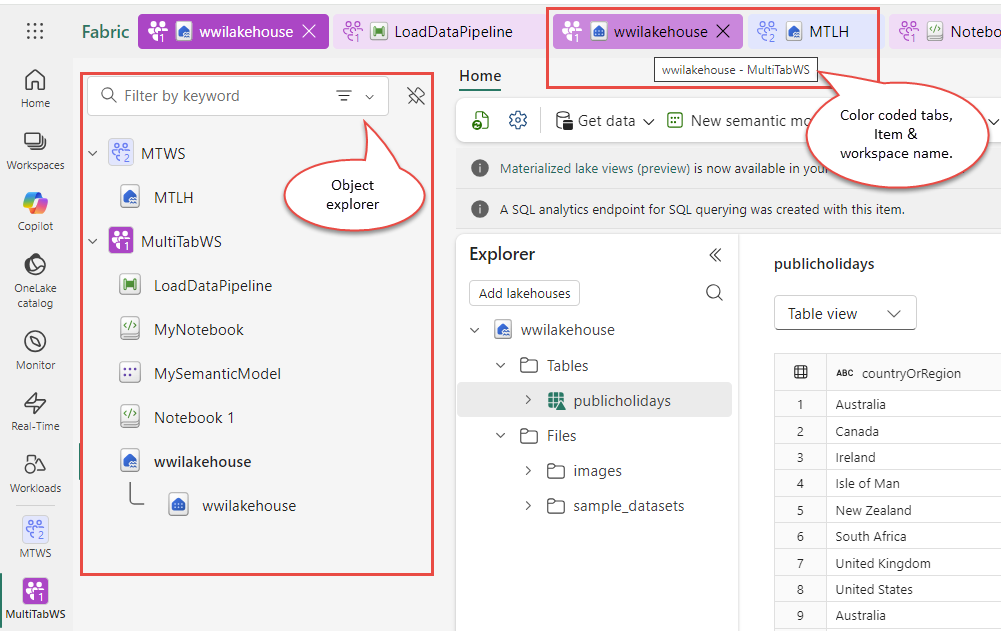
Microsoft Fabric object explorer and multitasking workspace Shown capabilities depend on licensing and configuration.
Different businesses. Different ways of working. A shared need for technology that supports real operations.









Fabric brings several data and analytics workloads into a SaaS platform. The platform is only part of the answer: reliable reporting also needs source ownership, business definitions, access decisions and a repeatable way to prepare and validate information.
Use Fabric’s shared logical data lake as part of an agreed information architecture. Define where source, prepared and consumption-ready data belongs and who is responsible for each stage.
Assess supported ingestion and transformation approaches for the source systems. Plan refresh schedules, connection requirements and failure handling around when the business needs the information.
Prepare and transform data in a suitable lakehouse design. Establish naming, quality checks and deployment practices so pipelines can be understood and maintained beyond their first author.
Consider a warehouse when SQL-based analytical modelling fits the team and workload. Agree the grain, history and business dimensions before loading tables and building reports.
Assess event-oriented analysis when the use case needs timely operational signals. Confirm supported sources, latency expectations and response ownership; not every business report needs a streaming architecture.
Define reusable measures and relationships for reporting. Reconcile important totals with source systems so departments do not produce different answers from the same platform.
Prepare suitable information for analytical experiments and supported AI scenarios. Keep access, quality and evaluation explicit instead of assuming that consolidated data is automatically ready for every model.
Assess ways to reference or replicate information without unnecessary copies where the source is supported. Review freshness, permissions and behavior when the source changes or becomes unavailable.
Plan workspaces, permissions, lineage and capacity ownership. Monitor workload demand and operational failures so the data platform remains useful as users and data volumes grow.
Fabric capacity and user licensing serve different purposes. Power BI sharing rights depend on the license and capacity scenario, while Copilot has its own prerequisites. Size the platform from workloads, concurrency and distribution requirements rather than treating a Power BI license as universal Fabric access.
Microsoft reference ↗Connect Microsoft Fabric to the applications your people rely on. Define the business handoff, data ownership and permissions before adding another integration.

The reporting and semantic-model experience within the wider Fabric platform. Keep validated business measures and audience access central to the design.
Explore solution ↗
A possible operational source for analytics. Confirm supported ingestion or mirroring options and validate business meaning and freshness.
Explore solution ↗
Connect suitable existing data assets through supported integration paths. Maintain clear source ownership and permissions.
Explore solution ↗
Bring agreed ERP information into the reporting architecture through supported interfaces. Customizations, entities and reconciliation require explicit assessment.
Explore solution ↗
Assess supported connections for business application data. Confirm the selected integration’s prerequisites, access model and update behavior.

Support identity, networking and related source services where required. Make cross-platform responsibilities and costs visible in the architecture.
Explore solution ↗Fabric does not replace your ERP or CRM. It can provide an analytical foundation across those systems, with documented source mappings, controlled access and measures that the business has agreed to use.
Read the Microsoft reference ↗Tripearltech provides Microsoft Fabric consulting, implementation and support from Ahmedabad, India, for businesses worldwide. Each engagement starts with your operating needs and a clear division of responsibility.
Review sources, current reports and the decisions that need better information. Compare Fabric with a simpler Power BI-only approach before recommending a platform scope.
Design workspaces, lakehouse or warehouse patterns, access and capacity assumptions. Define ownership and standards that make the environment maintainable.
Build agreed pipelines and transformations with quality checks and error handling. Document source mappings and the handling of late or corrected records.
Develop shared measures and reports around business questions. Reconcile figures and test drill paths with the people who use them.
Assess existing analytical assets and move them in a controlled sequence. Review performance, capacity demand and repeated data processing before adding resources.
Prepare engineers, analysts and consumers for their roles. Agree monitoring, access reviews, source changes and the support route for unreliable or delayed information.
The value of Microsoft Fabric depends on the process it improves. Explore common industry needs and the implementation decisions that help the solution fit.
Production, inventory and financial reports use inconsistent definitions and reporting dates.
Bring agreed sources into a governed analytical model. Reconcile quantities and values and make the timing of each measure visible to users.
Sales growth, inventory aging and collections are reviewed in separate spreadsheets.
Define common customers, products and periods, then connect the measures. Give teams a clear path from an exception to the records behind it.
Store and channel data arrives at different times and lacks consistent product mapping.
Establish source and dimension ownership, freshness targets and quality checks. Use event-oriented analysis only where the operational need justifies it.
Project delivery and financial performance are difficult to compare across systems.
Agree project identifiers, cost definitions and reporting periods. Prepare a consistent analytical view without changing the transactional system of record.
Management needs history across changing project and resource structures.
Design historical treatment and business dimensions before building dashboards. Document how reorganizations and corrections affect comparisons over time.
Entities submit reports with different account structures and currency assumptions.
Create agreed mappings and consolidation logic with finance owners. Reconcile entity and group views and make adjustments traceable.
Explore the Microsoft credential references relevant to this solution and its supporting implementation disciplines.
Fabric data engineering and analytics engineering are directly relevant disciplines for this platform. We connect technical delivery with business ownership of sources, measures and acceptance.
Discuss your project team ↗ Exam DP-700
Fabric ingestion, transformation and operations
View official credential ↗Exam DP-600Fabric analytical assets and semantic models
View official credential ↗Official Microsoft credential references, checked September 2026. These badges identify certification disciplines, not individual employee records. Related and retired credentials are labeled. Ask us about the verified credentials and practical experience of the specialists proposed for your engagement.
Use this guide to organize sources, business definitions and ownership before investing in a broader analytical platform.
Bring the right people and questions to your first implementation workshop.
Our Microsoft Fabric delivery approach makes design decisions, acceptance and readiness visible. The people who own the process stay involved from discovery through support.
Map business questions, sources and current reporting limitations.
An agreed first analytical outcome.Define data architecture, business measures and access.
Accepted models and capacity assumptions.Create pipelines, transformations and reporting with quality checks.
A documented and testable data product.Reconcile important measures and test real users and refresh behavior.
Business acceptance of trusted information.Monitor pipelines and capacity and govern source and measure changes.
Owned data products and a review cadence.Understand the solution, its boundaries and how Tripearltech can support your implementation.
Let’s talk about your business ↗Fabric is Microsoft’s SaaS data and analytics platform, bringing workloads such as integration, engineering, warehousing and Power BI into a connected environment. A successful implementation still needs a clear data and business design.
Power BI focuses on modelling, reporting and analysis and is part of the wider Fabric platform. Fabric adds broader data workloads; some businesses can meet their needs with a smaller Power BI-focused design.
OneLake is Fabric’s shared logical data lake. It helps organize analytical information across supported workloads, but permissions, structure and ownership still need deliberate design.
The decision depends on data types, processing patterns, team skills and consumption requirements. We assess the workload rather than assuming one design is best for every organization.
Supported interfaces can bring relevant information into an analytical design. Assess custom fields, company structures, permissions and refresh requirements, and reconcile business totals against the source.
No. Freshness depends on the source, integration method, processing and reporting design. Agree the required update time for each decision instead of applying real-time technology to every report.
Often parts can be retained, but models, connections, workspace design and licenses need review. Test report results and access after any change to the underlying analytical platform.
Capacity supports workloads, while user licensing and sharing requirements vary by scenario. Review the intended creators, viewers, workloads and Copilot prerequisites against current Microsoft terms before choosing capacity.
No. ERP remains responsible for its business transactions and rules. Fabric can provide an analytical layer across systems with controlled data access and agreed measures.
We begin with priority decisions, source availability and the current reporting process. A focused first release establishes definitions, quality and operational ownership before the platform expands.
Microsoft Fabric overview ↗ · OneLake overview ↗ · Fabric licensing and capacity ↗