Responsive website experiences
Create branded pages and navigation for the intended audience. Design for clear tasks, readable content and mobile use rather than exposing the internal application structure to visitors.
 MICROSOFT POWER PLATFORM
Give customers, vendors and partners a clear place to work with your organization. Microsoft Power Pages supports business websites and portals connected to structured data, with experiences designed around the tasks an external visitor needs to complete.
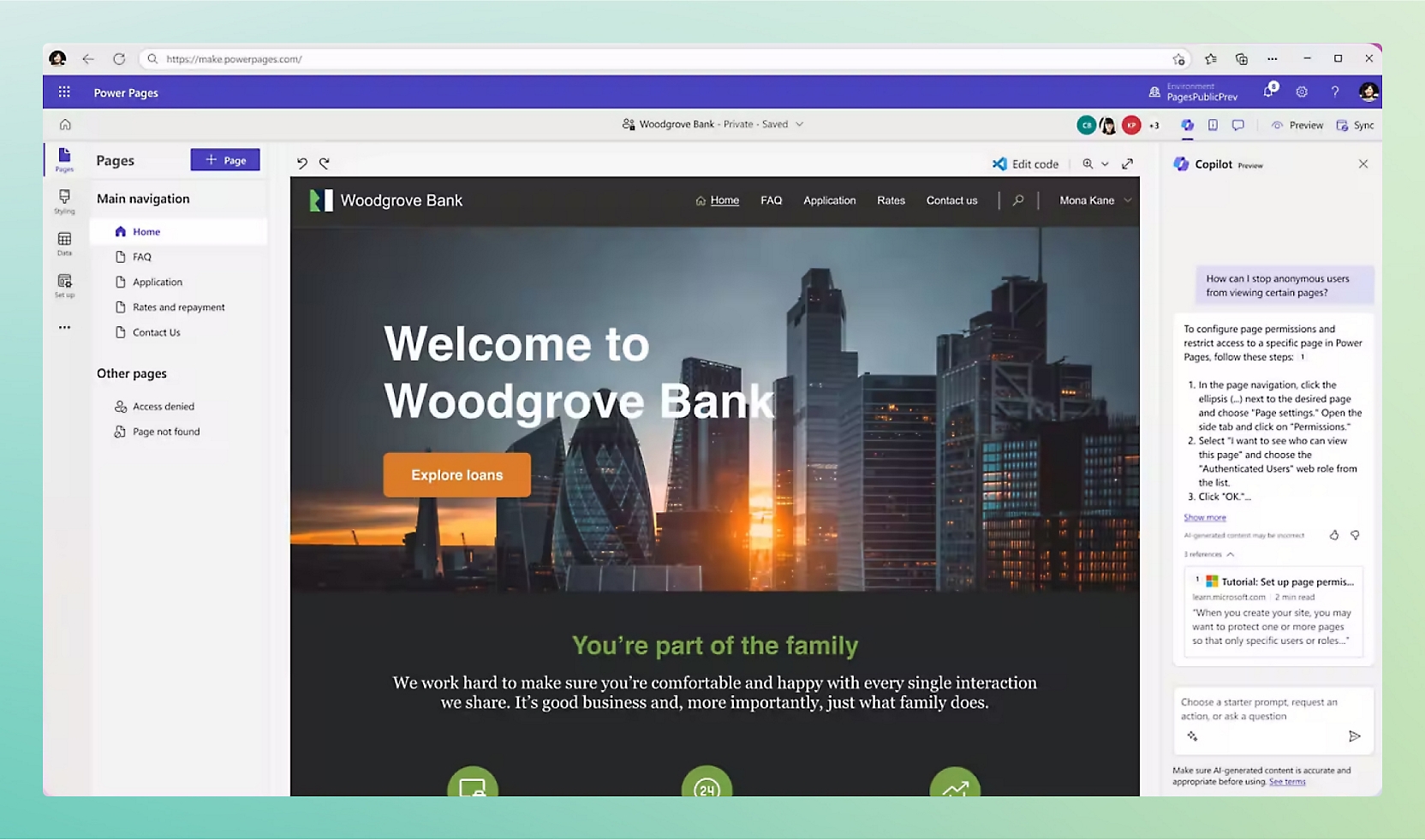 Explore the product view ↗
Microsoft product imagery. Interface and features vary by configuration.
Different businesses. Different ways of working. A shared need for technology that supports real operations.









For organizations that need external people to submit information, view permitted records or follow a process. Tripearltech designs Power Pages around identity, data ownership and the handoff to the people and systems behind the portal.
Create branded pages and navigation for the intended audience. Design for clear tasks, readable content and mobile use rather than exposing the internal application structure to visitors.
Collect agreed information through forms and multi-step experiences. Define required evidence, validation and recovery so visitors understand what is missing and can complete the process confidently.
Use Dataverse to support structured business information and relationships. Decide which data belongs in the portal model and how it connects to the authoritative operational systems.
Choose appropriate identity providers and access journeys for the audience. Account registration, invitations, recovery and changes in organization membership need deliberate design.
Control which visitors can access which pages and records. Test access across customers, vendors and roles; hiding navigation is not a substitute for record-level permissions.
Design experiences for approved requests, document exchange and status visibility. Features such as order history or invoice access require the appropriate data and integration scope.
Connect portal submissions to review and processing through suitable applications or flows. Keep visitors informed about status without exposing internal notes or sensitive decision data.
Assess supported APIs, code extensions and connected services where standard features do not cover the task. Validate performance, error handling and authorization at each boundary.
Plan environments, site configuration, monitoring and releases. Assess available assistance and AI features carefully, keeping owners accountable for content, access and the business process.
Power Pages licensing differs from internal Power Apps usage and considers authenticated or anonymous website use, capacity and related services. Dataverse storage, integrations and identity requirements also affect the architecture and ongoing cost.
Microsoft product overview ↗Connect Microsoft Power Pages to the applications your people rely on. Define the business handoff, data ownership and permissions before adding another integration.

Provide the structured data and relationships behind the portal, with table permissions designed around each external audience.

Route approved submissions and review tasks, with controlled connections and clear handling when downstream processing fails.

Give internal teams an application to review and manage the records submitted through the external website.

Assess customer request and case-status experiences, keeping public knowledge and private case information appropriately separated.

Connect agreed customer or vendor information through a supported integration. Keep financial posting and authoritative transaction control in the ERP.

Explore a conversational help experience grounded in approved content, with data boundaries and a route to a human for unresolved issues.
Power Pages can connect external experiences to the wider Microsoft ecosystem, but an ERP or CRM portal is not created simply by adding a logo and a sign-in page. Identity, record permissions, data synchronization and support responsibilities must be designed together.
Explore Microsoft’s product details ↗Tripearltech provides Microsoft Power Pages consulting, implementation and support from Ahmedabad, India, for businesses worldwide. Each engagement starts with your operating needs and a clear division of responsibility.
Map the audience, visitor tasks and internal handoffs. Decide what can be self-service, what requires review and which records should remain outside the website.
Build responsive pages, navigation, forms and status experiences around the agreed journey. Validate content and usability with representative customers, vendors or partners.
Configure access journeys, web roles and table permissions. Test organization-level separation and lifecycle changes so a visitor does not gain access to another business's records.
Connect approved information with Business Central, Dynamics 365 or other systems. Define the source of truth, synchronization timing, validation and what visitors see during an outage.
Provide a clear process for reviewing submissions, requesting corrections and completing work. Connect internal applications and workflows without exposing staff-only information externally.
Maintain site configuration, integrations and access behavior. Review incomplete journeys and support issues, then improve the experience through controlled releases.
The value of Microsoft Power Pages depends on the process it improves. Explore common industry needs and the implementation decisions that help the solution fit.
Customer and supplier document requests are spread across email threads.
Create a defined submission and review journey with permitted document access and visible status. Connect approved information to internal systems while retaining ownership of technical and commercial decisions.
Customers repeatedly ask staff for information already available internally.
Assess which order, account or service information can be safely exposed. Design the ERP connection and record permissions before promising a complete self-service account experience.
External stakeholders cannot easily submit information against the correct project.
Create a project-linked portal journey with clear participation roles and review status. Keep confidential commercial information and internal working notes outside the visitor's access.
Client onboarding requires repeated requests for missing information.
Use a structured, staged submission process with clear validation and correction requests. Give internal teams a consistent review view instead of another unmonitored inbox.
Invited vendors cannot see what is required or whether their submission is approved.
Design invitation, mandatory information, document review and status visibility as one journey. Define who can submit for a vendor organization and how access changes when contacts leave.
Different partners need different information and business processes.
Segment access using a deliberate data and role model, then test cross-partner separation. Provide only the records and actions each partner needs, with an accountable internal owner.
Explore the Microsoft credential references relevant to this solution and its supporting implementation disciplines.
Power Platform development supports portal extensions and integrations. Power BI is a related analytics discipline where portal reporting is in scope. These are supporting credential references, not a claim that Microsoft issues a separate Power Pages certification.
Discuss your project team ↗ Exam PL-400
Related platform development
View official credential ↗Exam PL-300Related reporting & analytics
View official credential ↗Official Microsoft credential references, checked September 2026. These badges identify certification disciplines, not individual employee records. Related and retired credentials are labeled. Ask us about the verified credentials and practical experience of the specialists proposed for your engagement.
A good portal connects the visitor journey to a dependable internal process. This guide helps you prepare audience access, data, submissions and ownership before development begins.
Bring the right people and questions to your first implementation workshop.
Our Microsoft Power Pages delivery approach makes design decisions, acceptance and readiness visible. The people who own the process stay involved from discovery through support.
Map external audiences, visitor tasks and the internal work each request creates.
Gate: portal scope and business ownership agreedDefine the experience, identity model, record permissions and connected data flows.
Gate: journey and access design acceptedDevelop the portal and verify submissions, integrations, restricted records and difficult user journeys.
Gate: functional and access scenarios passedInvite representative users, rehearse support and release the portal with clear internal responsibilities.
Gate: visitor and operational readiness approvedMonitor failed journeys and data exchanges, review access changes and prioritize improvements.
Gate: site ownership and support model acceptedUnderstand the solution, its boundaries and how Tripearltech can support your implementation.
Let’s talk about your business ↗Power Pages is a platform for building business websites and portals that can connect visitors with structured information and processes. It is suited to experiences such as customer requests, vendor submissions and partner interactions when identity and data access are carefully designed.
Power Apps is commonly used for business applications serving an organization's users and suitable guest scenarios. Power Pages is designed for website experiences, including external audiences. Identity, licensing and the data journey should guide the choice rather than visual appearance alone.
Yes, after defining the required journeys and system connections. Onboarding, document exchange and status visibility are possible design scenarios, but access to ERP orders, invoices or transactions requires explicit data and integration scope.
Power Pages has its own website usage and capacity licensing considerations, including authenticated and anonymous scenarios. We assess the expected audience and current Microsoft terms rather than assigning internal Power Apps licenses to every external visitor by default.
Power Pages uses Dataverse as a core part of its business data architecture. External system data can be connected through suitable integration patterns. We decide what should be stored or represented in Dataverse and where the authoritative record remains.
We design identity relationships, web roles and table permissions, then test with separate organizations and restricted roles. Page visibility alone is not enough. Changes to vendor contacts and organization membership also need a controlled process.
Yes, a supported integration can be scoped for the agreed customer or vendor processes. We define identifiers, data ownership, update timing and validation. Financial posting and ERP business rules should not be bypassed by an external website action.
These experiences can be designed around supported capabilities and storage choices. We assess document types, access, retention, size limits and review requirements. The journey should make missing information and correction requests clear to the visitor.
No. It is particularly useful when external business processes and structured data matter. A simple content-only marketing site may be better served by another platform. We assess the task, audience and ongoing operating cost before recommending Power Pages.
Tripearltech offers portal consulting, experience design, Power Pages development, identity and permission configuration, ERP/CRM integration, training and support from Ahmedabad, India. Global engagements are scoped around audience needs and the business process behind the portal.