Canvas applications
Create task-focused interfaces with control over screens and interactions. Design around the user's environment, device and process rather than turning a paper form into a crowded digital screen.
 MICROSOFT POWER PLATFORM
Replace disconnected forms and spreadsheet handoffs with applications designed around real business tasks. Microsoft Power Apps helps teams capture information, follow a process and work with the systems your organization already uses.
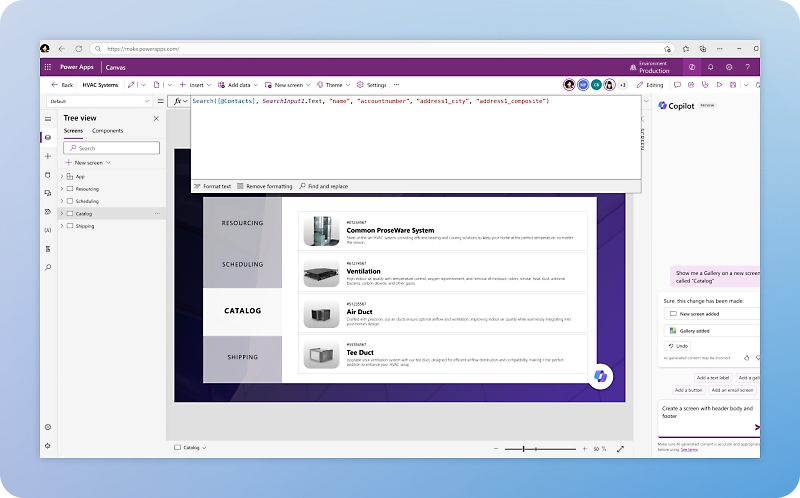 Explore the product view ↗
Microsoft product imagery. Interface and features vary by configuration.
Different businesses. Different ways of working. A shared need for technology that supports real operations.









For organizations that need focused applications without rebuilding their core systems. Tripearltech helps choose the right Power Apps approach, define the data model and make the experience useful for the people doing the work.
Create task-focused interfaces with control over screens and interactions. Design around the user's environment, device and process rather than turning a paper form into a crowded digital screen.
Use a structured Dataverse model to support data-rich business processes. Relationships, forms, views and roles provide a foundation for applications where consistent records matter more than a fully bespoke layout.
Define records, relationships and validation rules around the work being performed. Decide which rules belong in the data layer so they remain effective beyond a single screen.
Assess connectors and APIs for Microsoft and third-party services. Clarify ownership, licensing, request limits and failure handling before promising that every system can be connected without development.
Design responsive experiences for the intended devices and locations. Evaluate camera, barcode and offline requirements against the chosen app type and data architecture rather than assuming universal support.
Connect applications with Power Automate where a task needs review, notification or an external action. Define the status users should see while work is pending, rejected or interrupted.
Align application sharing and data permissions with actual responsibilities. A hidden button is not a security boundary; the underlying records and connected systems need appropriate controls.
Separate development, testing and production where appropriate. Package changes, manage connections and document ownership so an application does not depend on one maker's personal account.
Assess available AI-assisted creation and app experiences against the use case. Review generated data structures, formulas and behavior, and validate availability and capacity before rollout.
Power Apps licensing depends on users, connectors, Dataverse and application context. Microsoft 365 entitlements do not cover every premium scenario. We assess internal and guest users, environments, data capacity and integrations before recommending a deployment.
Microsoft product overview ↗Connect Microsoft Power Apps to the applications your people rely on. Define the business handoff, data ownership and permissions before adding another integration.

Provide a structured data foundation with relationships and access controls where the application calls for it.

Handle approved workflows and cross-system tasks, keeping users informed when an action is pending or needs intervention.

Bring analytical context into the business process and assess controlled action from reports when it serves a clear purpose.

Extend selected ERP interactions through supported interfaces while retaining posting rules and financial control in the ERP.

Extend related customer processes with an agreed data model rather than maintaining a second version of account information.

Assess conversational assistance and agent actions for defined tasks with explicit data permissions and human handoff.
SharePoint, Microsoft 365 and Azure services can support application scenarios through suitable connections. External customer and vendor experiences may be better served by Power Pages. The choice depends on identity, audience, data, usage and licensing, not simply screen design.
Explore Microsoft’s product details ↗Tripearltech provides Microsoft Power Apps consulting, implementation and support from Ahmedabad, India, for businesses worldwide. Each engagement starts with your operating needs and a clear division of responsibility.
Observe the task, users, exceptions and current handoffs. Decide whether Power Apps, a core-system change or another approach is the best fit before committing to development.
Design and build the appropriate application experience. Use real tasks to validate navigation, forms, feedback and accessibility with the people who will use the app.
Define tables, relationships, ownership and access. Plan migration and retention around the records the business needs, and keep critical rules consistent across entry points.
Connect approved business systems through supported interfaces. Design validation, identities, retry behavior and reconciliation so the application does not hide integration failures from users.
Review existing apps, dependencies, environments and ownership. Address fragile formulas, excessive permissions and personal-account dependencies with a practical improvement plan.
Prepare users and internal makers for their responsibilities. Maintain the application, monitor issues and manage changes as the process evolves.
The value of Microsoft Power Apps depends on the process it improves. Explore common industry needs and the implementation decisions that help the solution fit.
Inspection and exception records are captured on paper and re-entered later.
Build a focused capture experience with relevant product or job context. Validate device conditions and the handoff to quality or ERP processes before introducing it on the floor.
Warehouse and commercial exceptions travel through email without a shared status.
Create a structured request and review process that connects to agreed operational information. Keep stock changes and financial posting within controlled system boundaries.
Site observations and approvals are difficult to trace across projects.
Capture records against the correct project, assign review responsibility and retain useful evidence. Assess offline use and document storage based on actual site conditions.
Internal requests use inconsistent forms and employees cannot see progress.
Build a clear task experience with defined categories, status and ownership. Connect approvals and notifications without asking users to repeat information already held elsewhere.
Mobile staff work with separate spreadsheets and inconsistent reference data.
Design for the devices, connectivity and short interactions field users need. Validate synchronization and conflict handling where offline scenarios are required.
Small departmental apps grow without clear ownership or release control.
Establish a governed application model, supported data connections and test-to-production practices. Keep useful local flexibility while making support and change responsibility explicit.
Explore the Microsoft credential references relevant to this solution and its supporting implementation disciplines.
Power Platform development is directly relevant to Power Apps delivery. The accompanying Power BI credential represents a related analytics discipline for connected application scenarios, not a dedicated Power Apps certification.
Discuss your project team ↗ Exam PL-400
Related platform development
View official credential ↗Exam PL-300Related reporting & analytics
View official credential ↗Official Microsoft credential references, checked September 2026. These badges identify certification disciplines, not individual employee records. Related and retired credentials are labeled. Ask us about the verified credentials and practical experience of the specialists proposed for your engagement.
A useful app starts with a well-understood task. Use this guide to prepare users, data, integrations and ownership before the first screen is built.
Bring the right people and questions to your first implementation workshop.
Our Microsoft Power Apps delivery approach makes design decisions, acceptance and readiness visible. The people who own the process stay involved from discovery through support.
Observe the business task, user environment and existing systems before selecting the app approach.
Gate: use case and platform fit agreedDefine screens, data, permissions and integration behavior with business and technical owners.
Gate: experience and data model acceptedDevelop in controlled environments and test everyday work, exceptions and restricted access.
Gate: application scenarios and integrations verifiedTrain representative users, test devices and support routes, and phase adoption where appropriate.
Gate: user and operational readiness approvedMonitor failures and user feedback, maintain dependencies and manage changes through an agreed backlog.
Gate: application ownership and release process acceptedUnderstand the solution, its boundaries and how Tripearltech can support your implementation.
Let’s talk about your business ↗Power Apps is a platform for building business applications using low-code tools and supported extensions. It can help with structured tasks and data entry across departments. Tripearltech assesses the process and data architecture before deciding how the app should be built.
Canvas apps provide substantial control over the interface and are useful for focused tasks. Model-driven apps are organized around a Dataverse data model and suit structured, data-rich processes. The choice depends on the work, not simply a visual preference.
A focused app can extend selected ERP interactions, but it should not casually recreate accounting, stock or other core transaction logic. We decide what belongs in the app and what must remain in the ERP, then connect the two through an agreed design.
Not every canvas application requires Dataverse. The appropriate data source depends on relationships, security, scale and integration requirements. Model-driven apps use Dataverse. We assess the architecture rather than choosing a source only because it is already available.
Mobile and offline possibilities depend on the app type, data sources and configuration. We assess the required tasks and test devices, synchronization and conflicts under representative conditions. Offline support should not be assumed for every connector or feature.
Some use rights may be included, but premium connectors, Dataverse and other scenarios can need additional licensing. We review actual users, connections, application context and capacity against current Microsoft terms before estimating the ongoing cost.
Guest access can suit some scenarios, but licensing, identity and support need review. For a broad external audience, Power Pages may be more appropriate. We compare the options against the experience and data access the audience needs.
Yes, if the solution is designed and documented for that responsibility. We can train internal makers and administrators, establish release practices and identify where specialist support is still needed. Low-code does not eliminate the need for ownership or testing.
We assess application sharing, data permissions, connected identities and environment policies. Testing includes what each role must not access. Hiding controls in the interface is not treated as protection for the underlying business information.
Tripearltech offers Power Apps consulting, canvas and model-driven development, Dataverse design, ERP integration, audits, training and support from Ahmedabad, India. We serve global businesses with scope and support arrangements agreed around their users and processes.