Drafting & document work
Use supported Word experiences to develop or revise a first draft. Define the source material, intended reader and reviewer so generated text becomes a useful starting point for accountable work.
 MICROSOFT CLOUD & AI
Bring useful AI assistance into the documents, conversations and decisions that shape your working day. Tripearltech helps you prepare Microsoft 365 Copilot, choose meaningful use cases and build confidence through a measured rollout with your people involved.
 View image at full size ↗
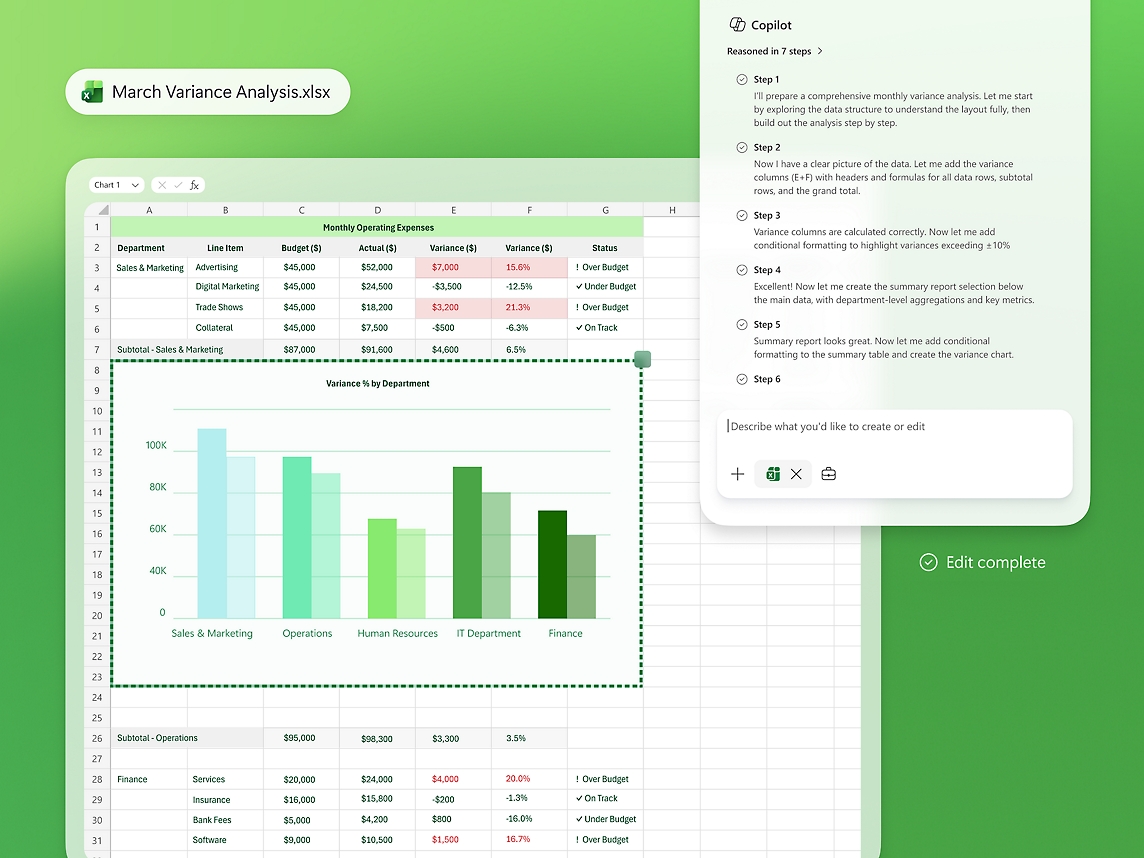
Copilot in Excel creating a variance analysis and chart. Shown capabilities depend on licensing and configuration.
Different businesses. Different ways of working. A shared need for technology that supports real operations.









Copilot is most useful when staff know what they are asking, which information is appropriate and how to review the answer. We focus on repeatable working tasks, trustworthy content and practical training rather than treating license activation as the finish line.
Use supported Word experiences to develop or revise a first draft. Define the source material, intended reader and reviewer so generated text becomes a useful starting point for accountable work.
Apply supported Outlook assistance to lengthy threads and draft replies. Train staff to check commitments, names and dates before sending anything outside the organization.
Assess available Teams capabilities for summaries and action capture. Agree meeting policies, required inputs and how participants verify the record before treating an action as assigned.
Explore supported Excel assistance with appropriately structured data. Validate formulas, assumptions and totals against the business question rather than accepting a plausible-looking result.
Use relevant PowerPoint assistance to structure a presentation from approved material. Review figures, narrative and brand requirements before sharing the finished deck.
Evaluate work-grounded experiences for finding and combining information the user is allowed to access. Clear content ownership and accurate access groups remain essential.
Pilot available research and analysis experiences with tasks whose quality can be checked. Ask users to retain sources and distinguish established facts from suggestions.
Assess a focused agent when a repeatable knowledge task needs additional instructions or approved tools. Confirm publication, permissions, consumption and the person responsible for maintenance.
Compare an agreed task before and after the pilot. Include correction effort and answer quality alongside time spent so the decision to expand rests on evidence.
Copilot experiences differ by license, app, tenant configuration and data grounding. Included chat or basic app access is not equivalent to the full paid work-grounded experience. Review Microsoft 365 Copilot, Copilot Business bundles and any metered agents against your actual use cases.
Microsoft product overview ↗Connect Microsoft 365 Copilot to the applications your people rely on. Define the business handoff, data ownership and permissions before adding another integration.


The working content and collaboration environment. Start with licensed applications, supported configurations and clear ownership of email, files and workspaces.

Extend a defined task with an agent when justified. Keep the approved knowledge, actions, channels and consumption model explicit.

Route a defined outcome into an approved workflow. Human review and exception handling should be designed before allowing an action to change a business record.

Use established reporting for validated business measures. Power BI Copilot has its own prerequisites and is not unlocked universally by a Microsoft 365 Copilot subscription.

Keep financial and operational records authoritative in the ERP. Assess supported connectors or integrations for any workplace AI scenario requiring those records.

Use a separately scoped cloud or AI architecture when custom data processing is needed. Azure consumption and custom development are not implied by a workplace Copilot license.
We distinguish standard workplace assistance from an agent, a workflow and a custom AI application. Each has different access, support and licensing responsibilities; connecting them should solve a specific business problem.
Explore Microsoft’s product details ↗Tripearltech provides Microsoft 365 Copilot consulting, implementation and support from Ahmedabad, India, for businesses worldwide. Each engagement starts with your operating needs and a clear division of responsibility.
Review licenses, application readiness, information locations and sharing patterns. Identify the issues that should be resolved before employees receive broader AI access.
Select a small set of tasks with willing users, clear inputs and a way to judge the output. Agree a baseline and success criteria before launching the pilot.
Work with information owners to review sensitive workspaces, stale material and excessive sharing. Document unresolved risks and the changes required for the pilot group.
Prepare the selected experience, policy settings and user communications. Test with actual roles and confirm that employees understand the boundaries of the tool.
Teach staff how to provide context, ask for useful outputs and review results. Where needed, scope a focused agent with an owner and a support plan.
Assess usage alongside quality, correction effort and user feedback. Expand what works, retire weak use cases and keep training current as the service changes.
The value of Microsoft 365 Copilot depends on the process it improves. Explore common industry needs and the implementation decisions that help the solution fit.
Consultants spend substantial time assembling background information and first drafts.
Pilot briefing and document tasks using approved material. Keep a subject specialist responsible for source checking and the final client-facing output.
Managers prepare updates from scattered operational discussions.
Assess meeting and document assistance for management communication. Validate production and financial figures against the operational systems before distribution.
Account teams repeatedly reconstruct context before customer conversations.
Use approved correspondence and accessible documents to prepare a briefing. Ask the account owner to verify open commitments and recent changes.
Employees receive inconsistent answers from outdated policy documents.
Prepare an owned, current policy collection and a defined answer-review process. Escalate personal or sensitive cases to the responsible HR specialist.
Narrative reporting takes time after the numbers have been reconciled.
Use assistance to prepare explanatory drafts from approved inputs. Finance retains responsibility for calculations, interpretation and final approval.
Long meetings and fragmented updates make follow-through difficult.
Pilot structured preparation and action review. Confirm decisions with participants and keep an accountable owner for every action.
Explore the Microsoft credential references relevant to this solution and its supporting implementation disciplines.
Workplace AI readiness relies on Microsoft 365 administration and identity discipline as well as practical adoption experience. These supporting credentials do not represent a dedicated Copilot certification.
Discuss your project team ↗ Exam MS-102
Expert credential · Prerequisite certification required · Retires 30 November 2026
View official credential ↗ Exam SC-300
Identity and access administration
View official credential ↗Official Microsoft credential references, checked September 2026. These badges identify certification disciplines, not individual employee records. Related and retired credentials are labeled. Ask us about the verified credentials and practical experience of the specialists proposed for your engagement.
Use this guide to choose a pilot, prepare content access and evaluate whether Copilot improves a real working task before a wider rollout.
Bring the right people and questions to your first implementation workshop.
Our Microsoft 365 Copilot delivery approach makes design decisions, acceptance and readiness visible. The people who own the process stay involved from discovery through support.
Review the workplace, entitlements and information access.
A readiness report with accountable owners.Choose tasks and pilot users with measurable review criteria.
An agreed pilot and quality baseline.Address priority content issues, configure access and train participants.
A prepared pilot group and support route.Run real tasks and review the outputs with process owners.
Evidence of usefulness and known limits.Roll out suitable scenarios and maintain guidance as usage grows.
An adoption plan with periodic reviews.Understand the solution, its boundaries and how Tripearltech can support your implementation.
Let’s talk about your business ↗It supports workplace tasks such as document drafting, email preparation, information discovery and meeting follow-through in supported experiences. Its usefulness depends on the task, license and information available to the user.
Experiences vary in app integration, service priority and grounding in work information. Included chat or basic app access should not be presented as identical to the full work-grounded paid experience; confirm the current entitlement.
Copilot respects the user’s access permissions. However, information that was already overshared may become easier to discover. Permission review is therefore a practical readiness step.
Microsoft states that prompts, responses and data accessed through Microsoft Graph are not used to train the foundation models for this service. Review the applicable terms, connected services and model choices for your deployment.
No. Users must verify sources, figures and business meaning. We teach people to review results and define tasks where an incorrect answer can be identified before it affects a decision.
A workplace Copilot license does not establish an unrestricted ERP integration. Any action against business records needs supported tools, scoped permissions, approval rules and testing.
Choose people with repeatable information tasks, usable source material and willingness to provide feedback. A focused pilot usually provides better evidence than allocating licenses without a task plan.
Begin with the information and access risks relevant to the selected pilot. Assign owners, correct important oversharing and remove misleading material before expanding the scope.
We can assess and scope an agent around a defined task using appropriate Microsoft tools. Knowledge sources, permitted actions, evaluation, licensing and ongoing ownership are agreed before development.
Record the time and quality of a task before the pilot, then compare the assisted process including review and correction. Adoption counts alone do not prove a business benefit.
Copilot experiences and licensing ↗ · Data, privacy and security ↗