Account & contact management
Keep business relationships, decision-makers and interactions together. Establish account ownership and duplicate-handling rules so a change of salesperson does not mean starting the relationship again.
 MICROSOFT DYNAMICS 365
Bring relationships, opportunities and next steps into one CRM. Microsoft Dynamics 365 Sales helps your people spend less time reconstructing the story and more time having the conversations that move business forward.
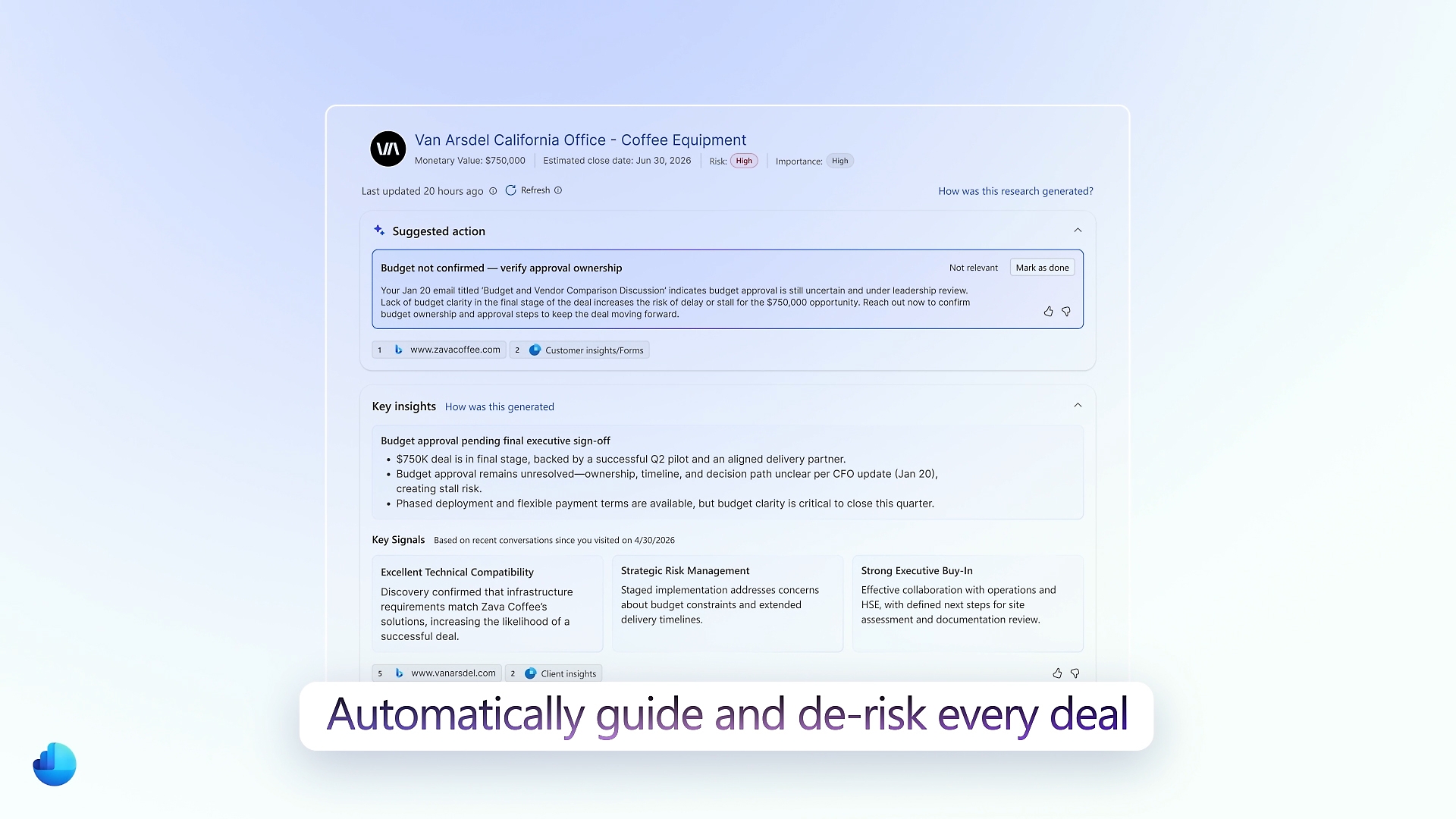 Explore the product view ↗
Microsoft product imagery. Interface and features vary by configuration.
Different businesses. Different ways of working. A shared need for technology that supports real operations.









For organizations managing relationship-led selling, multiple stakeholders or longer buying cycles. Tripearltech shapes Dynamics 365 Sales around your sales process, from qualification to the handover after a win.
Keep business relationships, decision-makers and interactions together. Establish account ownership and duplicate-handling rules so a change of salesperson does not mean starting the relationship again.
Capture enquiries and qualify them against agreed criteria. Define what makes a lead worth pursuing, what information is required and when it should become an opportunity.
Follow potential deals through meaningful stages with activities, stakeholders, expected value and next steps. Give managers a basis for coaching beyond a verbal status update.
Use products, price lists and sales quotations to support the commercial process. Assess approvals, complex configuration and ERP pricing separately where your quotation rules need more than standard CRM.
Review pipeline movement and forecast categories across the sales organization. Agree stage definitions and update responsibilities so reports reflect the team's best understanding, not stale records.
Evaluate sales accelerator work lists and sequences to organize follow-ups. Match the cadence to the buying process and confirm which features and usage capacities your chosen edition includes.
Use available interaction insights to prepare for customer conversations and review sales activity. Establish recording permissions, data quality and appropriate use before enabling conversation intelligence.
Assess summaries, preparation assistance and available sales agents against specific tasks. Validate availability, licensing and permissions; keep sellers responsible for messages, commitments and commercial judgment.
Configure views, forms, business rules and role-based access around daily work. A useful implementation makes the next action clear and limits unnecessary data entry.
Professional, Enterprise and Premium serve different needs. Advanced intelligence, agents, capacity and connected products depend on the chosen offer. We compare your requirements with current Microsoft terms before recommending licenses.
Microsoft product overview ↗Connect Dynamics 365 Sales to the applications your people rely on. Define the business handoff, data ownership and permissions before adding another integration.

Bring service context into account conversations and design a controlled handover between relationship owners and support teams.

Connect agreed customer and order information with ERP. Decide which system owns prices, credit, fulfilment and invoices before synchronizing data.

Connect project opportunities to estimation and delivery where the solution architecture supports it, preserving agreed scope and commercial assumptions.

Route approvals and follow-up notifications across approved systems, with clear ownership when a flow fails.

Extend the seller experience with focused applications and controlled forms for business-specific requirements.

Explore agents that use approved knowledge and actions. Define boundaries, handoffs and monitoring before introducing autonomous activity.
Microsoft 365 collaboration can support everyday seller work in Outlook and Teams. Power BI can extend sales analysis; Customer Insights can support a separately scoped marketing journey. Each connection needs an appropriate license, data model and permission design.
Explore Microsoft’s product details ↗Tripearltech provides Dynamics 365 Sales consulting, implementation and support from Ahmedabad, India, for businesses worldwide. Each engagement starts with your operating needs and a clear division of responsibility.
Map how leads arrive, how deals are qualified and why opportunities stall. Define CRM scope, sales stages, ownership and measurable outcomes before configuration begins.
Configure the account model, opportunity stages, products, views and access roles. Validate the process with salespeople, managers and sales operations rather than relying only on administrator reviews.
Move agreed accounts, contacts, opportunities and history from spreadsheets or another CRM. Resolve duplicate organizations, inactive contacts and inconsistent ownership through trial migrations.
Connect website enquiries, ERP and approved business systems. Design identifiers, update rules and failure handling so an integration does not create conflicting customer records.
Build useful pipeline views and role-based training around real sales reviews. Agree what must be updated, by whom and when, so management reporting supports action.
Review adoption, recurring issues and changes to your sales process. Maintain integrations, assess releases and prioritize enhancements without filling the CRM with unused fields.
The value of Dynamics 365 Sales depends on the process it improves. Explore common industry needs and the implementation decisions that help the solution fit.
Enquiries involve technical teams, multiple decision-makers and a long quotation cycle.
Track stakeholders and agreed stages, record technical dependencies and connect accepted quotations to the ERP handover. Assess specialist configurators where equipment pricing is complex.
Account knowledge and repeat-business opportunities sit with individuals.
Create a shared account history and follow-up process. Bring relevant ERP context into the design while retaining pricing, batch and fulfilment control in the appropriate operational system.
Partners manage prospects differently and pipeline reviews lack a common definition.
Define qualification, proposal and decision stages around service engagements. Capture scope assumptions and expected timing so delivery teams understand the work being discussed.
Tender activity, revisions and bid decisions are scattered across email.
Structure opportunities around bid milestones, stakeholder responsibility and next actions. Assess document management and bid approval needs separately from standard opportunity tracking.
Territories use different records and managers cannot compare pipeline consistently.
Agree account ownership, permissions and common forecast definitions, allowing justified regional variation. Use clean data to make cross-team reviews more useful.
A deal is won, but onboarding and renewal responsibility are unclear.
Design handover tasks and ownership at close. Connect delivery and support where needed, and define renewal tracking as an explicit process rather than assuming every subscription scenario is standard.
Explore the Microsoft credential references relevant to this solution and its supporting implementation disciplines.
Strong CRM delivery combines an understanding of sales behavior with the ability to configure and extend Dynamics 365 responsibly. These credential references cover the relevant consulting and development disciplines.
Discuss your project team ↗ Exam AB-210
Sales consulting · Beta exam
View official credential ↗Exam PL-400Related platform development
View official credential ↗Official Microsoft credential references, checked September 2026. These badges identify certification disciplines, not individual employee records. Related and retired credentials are labeled. Ask us about the verified credentials and practical experience of the specialists proposed for your engagement.
A CRM should make selling clearer, not add another reporting chore. Use this planning guide to agree sales stages, clean customer data and prepare your people before rollout.
Bring the right people and questions to your first implementation workshop.
Our Dynamics 365 Sales delivery approach makes design decisions, acceptance and readiness visible. The people who own the process stay involved from discovery through support.
Review lead sources, sales cycles, account structures and reporting habits. Agree what better selling visibility means for your organization.
Gate: sales process and CRM scope approvedDefine opportunity stages, customer ownership, permissions and ERP handover. Decide which fields genuinely support a decision.
Gate: process and data design acceptedConfigure the CRM, rehearse migration and test qualification, quotation, reassignment and close scenarios.
Gate: sales scenarios and migrated data acceptedTrain sellers and managers using their daily tasks. Pilot the process, resolve adoption barriers and confirm support routes.
Gate: business and user readiness approvedMonitor data completeness, usage and pipeline discipline. Use feedback from sales reviews to prioritize improvements.
Gate: ownership and improvement backlog agreedUnderstand the solution, its boundaries and how Tripearltech can support your implementation.
Let’s talk about your business ↗It is Microsoft's CRM application for managing relationships and sales opportunities. It supports account and contact records, lead qualification, pipeline activity and sales management. Tripearltech configures it around the way your organization sells rather than asking every team to follow the same generic process.
No. Its main role is customer relationships and selling. Finance, stock, fulfilment and accounting normally belong in an ERP such as Business Central or Dynamics 365 Finance and Supply Chain Management. An integration can connect agreed information between them.
The choice depends on process complexity, customization, intelligence features and usage. We assess Professional, Enterprise and Premium against current Microsoft licensing terms. A license decision should follow a requirement review, not simply a comparison of headline prices.
Yes, after assessing the source data and the history you need. We agree field mapping, deduplication, ownership and the treatment of attachments and activities. Trial migrations help the sales team verify records before final cutover.
Yes, supported integration scenarios are available, and additional needs can be assessed. We define ownership of customers, products, prices and transactions, then test synchronization and exceptions. Not every ERP customization is automatically covered by a standard connection.
Microsoft 365 integration can bring customer context into familiar work. The exact experience depends on configuration, licenses and permissions. We assess which activities should be captured and how users can avoid duplicate or unnecessary records.
AI assistance and available agents can support defined tasks, but they do not replace accountable sales management. We assess data access, feature availability, usage charges and human review before enabling actions that affect customers or commercial commitments.
We involve sellers early, remove unnecessary fields and teach real scenarios. Managers also need to use the CRM during reviews. Adoption is assessed through useful activity and reliable records, rather than training attendance alone.
Timing depends on the sales process, migration, integrations, regions and user availability. Discovery establishes a realistic scope and phased plan. A focused first release can be appropriate when additional teams or advanced features are not yet ready.
Yes. From Ahmedabad, India, Tripearltech offers Dynamics 365 Sales assessment, implementation, migration, integration, training and support for global businesses. We agree working hours, responsibilities and support arrangements around each engagement.