Work order management
Define the work, required tasks, products and services in a structured work order. Track status through preparation, dispatch, execution and review so office teams understand what has actually happened.
 MICROSOFT DYNAMICS 365
Connect work orders, scheduling, assets and the people doing the work. Microsoft Dynamics 365 Field Service helps dispatchers and technicians coordinate service beyond the office, with a clearer view of what each job needs.
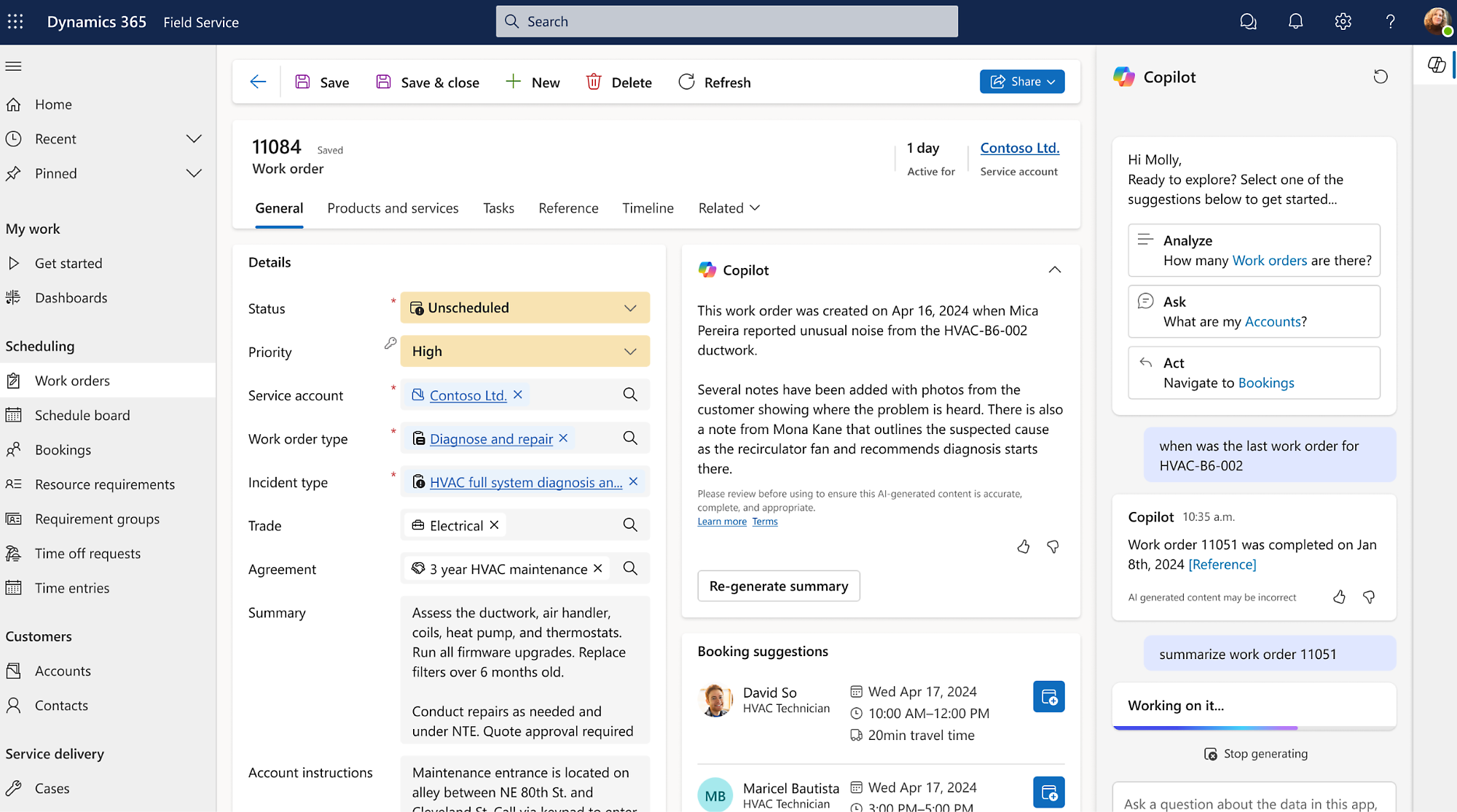 Explore the product view ↗
Microsoft product imagery. Interface and features vary by configuration.
Different businesses. Different ways of working. A shared need for technology that supports real operations.









For organizations installing, inspecting and maintaining equipment at customer locations. Tripearltech brings the service process together around the asset, the work and the technician responsible for it.
Define the work, required tasks, products and services in a structured work order. Track status through preparation, dispatch, execution and review so office teams understand what has actually happened.
Use scheduling tools to match work to resource availability, skills and location. Configure realistic travel and working-time assumptions instead of treating every technician as interchangeable.
Give field staff access to relevant jobs and records through the mobile application. Assess offline profiles, device management and synchronization around real site connectivity.
Record installed customer assets and the service activity associated with them. Agree identifiers and asset hierarchies so technicians can find the right equipment and its history.
Plan recurring service activity using configured agreements and booking rules. Validate the connection between commercial commitments, job generation and the people available to complete them.
Structure inspections and capture the information needed to review work. Agree required evidence and exception handling with service managers before adding unnecessary forms to every visit.
Track the products needed and used for service work. Define how technician stock, purchasing and ERP inventory relate so parts consumption is not recorded inconsistently.
Assess IoT-triggered service and connected asset data where a clear operational need exists. Connectivity, devices, cloud services and alert-to-work-order behavior require separate design.
Review completion, repeat visits and resource activity using agreed measures. Evaluate available Copilot assistance for practical tasks while maintaining human responsibility for scheduling and service decisions.
Scheduling optimization, connected IoT scenarios and additional applications can require separate licensing or services. We assess geographic coverage, resource types, mobile connectivity and integration needs before defining the deployment.
Microsoft product overview ↗Connect Dynamics 365 Field Service to the applications your people rely on. Define the business handoff, data ownership and permissions before adding another integration.

Connect initial diagnosis and customer conversations to field work, with clear ownership of the case and the on-site task.

Design the financial handoff for agreed service transactions, billing and costs, using an integration appropriate to the application landscape.

Assess the connection between service parts, operational stock and procurement. Define inventory ownership rather than duplicating stock logic.

Notify customers or internal teams at agreed milestones, with approval and recovery behavior for important communications.

Extend specific service tasks where the standard mobile and office experiences need a controlled addition.

Maintain shared service, customer and asset records with appropriate security and a consistent integration model.
Microsoft 365 can support collaboration between dispatchers, technicians and specialists. Azure services may support connected-device scenarios, while Power BI can extend service analysis. These are assessed connections, not a promise that every component is included in Field Service.
Explore Microsoft’s product details ↗Tripearltech provides Dynamics 365 Field Service consulting, implementation and support from Ahmedabad, India, for businesses worldwide. Each engagement starts with your operating needs and a clear division of responsibility.
Review service types, asset records, technician coverage, parts flows and customer commitments. Identify what causes repeat calls, scheduling friction and incomplete work information.
Configure work orders, incident types, resources, territories and agreements around actual service operations. Test urgent calls and rescheduling as well as planned work.
Prepare role-based mobile access and offline data profiles where needed. Validate devices, permissions, synchronization and practical use at representative customer sites.
Clean customer locations, asset identities, agreement records and relevant service history. Rehearse migration and confirm that a technician can identify the correct equipment.
Connect approved parts, billing and asset data with enterprise systems. For IoT scenarios, define meaningful alerts and responsibilities so telemetry does not simply create more work.
Train dispatchers, technicians and service managers on their own responsibilities. Review recurring issues, schedule assumptions and mobile feedback after launch.
The value of Dynamics 365 Field Service depends on the process it improves. Explore common industry needs and the implementation decisions that help the solution fit.
Technicians arrive without the right asset history, parts or job instructions.
Structure asset records and work orders before dispatch. Connect parts preparation and required skills to scheduling, helping teams reduce avoidable uncertainty at the customer site.
Planned maintenance competes with urgent site calls and regional travel.
Define priorities, service areas, working calendars and escalation rules. Assess connected-device scenarios and specialist safety procedures separately from the scheduling application.
Recurring contracts are managed in calendars while completed work is recorded elsewhere.
Configure agreements and recurring jobs, then capture service activity against the location or asset. Validate technician capacity and the commercial billing handoff.
Equipment identity and previous interventions are difficult to trace during a visit.
Maintain structured asset history and inspection records. Validate documentation, access and any regulated procedures with qualified business specialists; software alone does not establish compliance.
After-sales support is disconnected from sales and stock records.
Design a handover from the installed equipment record to service agreements and work orders. Connect approved inventory and financial data so operational ownership stays clear.
Dispatchers cannot easily see the skills and availability needed across territories.
Configure resources, skills and calendars around actual teams. Pilot scheduling rules with urgent, delayed and multi-visit work before expanding the rollout.
Explore the Microsoft credential references relevant to this solution and its supporting implementation disciplines.
Successful field service depends on practical scheduling, mobile readiness and sound integration. The historical product credential below is clearly identified; current project staffing should be assessed through relevant experience and verified individual records.
Discuss your project team ↗ Exam MB-240
Retired · Historical credential reference
View official credential ↗Exam PL-400Related platform development
View official credential ↗Official Microsoft credential references, checked September 2026. These badges identify certification disciplines, not individual employee records. Related and retired credentials are labeled. Ask us about the verified credentials and practical experience of the specialists proposed for your engagement.
Prepare the work before it reaches the technician. This guide helps you organize assets, scheduling assumptions, mobile access and the handoff between service and finance.
Bring the right people and questions to your first implementation workshop.
Our Dynamics 365 Field Service delivery approach makes design decisions, acceptance and readiness visible. The people who own the process stay involved from discovery through support.
Follow the service request from intake to completed visit. Review technicians' real constraints and service promises.
Gate: field process and pilot scope agreedDefine work orders, assets, resource rules, mobile access and the parts-to-billing handoff.
Gate: operational design acceptedBuild the process and test dispatch, offline work, rescheduling, parts usage and job review.
Gate: end-to-end service scenarios passedStart with representative resources and service types. Coach dispatchers and technicians, then expand when the pilot is ready.
Gate: field and office readiness confirmedReview incomplete work, repeat visits and scheduling exceptions. Improve the process with feedback from the people using it.
Gate: support and operational ownership acceptedUnderstand the solution, its boundaries and how Tripearltech can support your implementation.
Let’s talk about your business ↗It is a business application for coordinating work at customer sites, including work orders, resources, scheduling, customer assets and technician activity. Tripearltech helps connect those processes to the service desk, inventory and financial systems where required.
Customer Service focuses on cases and customer support. Field Service focuses on work that must be scheduled and performed in the field. Organizations may use both when a support case needs an on-site visit, with an agreed handoff between the two.
The mobile application supports configured offline scenarios. We assess which records and functions are needed offline, device requirements and synchronization behavior. Offline capability must be tested under real conditions rather than assumed to cover every customization.
Scheduling tools and automated optimization are not the same thing. Resource Scheduling Optimization is assessed as an additional capability with its own licensing and requirements. Good results also depend on reliable skills, location, duration and calendar data.
Service agreements can support recurring work generation using configured rules. We validate recurrence, booking behavior, asset coverage and resource capacity. Complex contract pricing or billing needs may require additional design and financial integration.
Yes, an integration can be scoped around products, stock, consumption and purchasing. We establish the system of record and financial treatment first, then test exceptions and reconciliation so service and warehouse teams do not maintain conflicting quantities.
Connected field service scenarios can use device and cloud services, but they need a separate architecture and cost assessment. We define which events justify action, how alerts are reviewed and when a work order should be created.
Microsoft has retired the Field Service Functional Consultant Associate certification and renewal assessment. We label MB-240 as a historical reference on this page. Ask for current individual credential records and practical Field Service experience when assessing proposed project specialists.
We first agree a baseline and the measures relevant to your service model, such as repeat visits, completion information, response times or parts availability. Results depend on process adoption and data quality; we do not assume a universal efficiency percentage.
Yes. Tripearltech provides Field Service consulting, implementation, mobile configuration, integration, training and support from Ahmedabad, India. We assess geography, working hours, local processes and support coverage for the specific engagement.